

Textile manufacturing ERP software
Karpan ERP is ERP software for textile manufacturers and processing units. It tracks yarn and fabric lot by lot, keeps material sent to job workers on record, checks quality before stock is used, and shows the cost each process adds.
What does a textile ERP do?
A textile ERP keeps track of material as it moves through a textile business: what came in, which lot it belongs to, where it is now, what was lost on the way and what it costs at each stage. Fabric and yarn are not counted like boxes. They arrive in bales and lots, go out for dyeing or printing, and come back a little less.
Karpan ERP follows every lot from purchase to receipt, inspection, reservation and issue. When material goes to a dyer, printer or other processor, it stays on that job worker’s stock until it returns. When it comes back, Karpan logs the loss and works out the new rate per unit, so the next stage starts with the true cost.
It suits fabric makers, knitting and weaving units that send work out, dyeing, printing and finishing houses, and groups that run several units or stores. If you also make garments, see Karpan for garment manufacturing. We sell and support Karpan ERP in India, Bangladesh and Vietnam.
From the supplier’s bale to the next process.
Purchase
Raise a purchase order for yarn, greige fabric or other material, with approval before it goes out.
Receive by lot
Receive against the PO and split the quantity into bale/than numbers and vendor lots. Lot numbers can be given automatically.
Inspect
Record OK and rejected quantity for each lot. Only OK quantity becomes usable stock. Rejected material goes back through a vendor return.
Reserve
Hold free stock for an order, so the same lot is not promised twice. Free, reserved and issued stock stay visible per lot.
Send for processing
Make a job worker order and issue lots oldest first to the dyer, printer or other processor. An issue larger than the stock you hold is blocked.
Receive back
Log what comes back for each lot and the loss. Base rate, process cost and loss add up to the new item rate.
Next stage or store
Processed material goes back into lot-wise stock, ready for the next process, a transfer to another store, or use in production.
Know what every lot is doing.
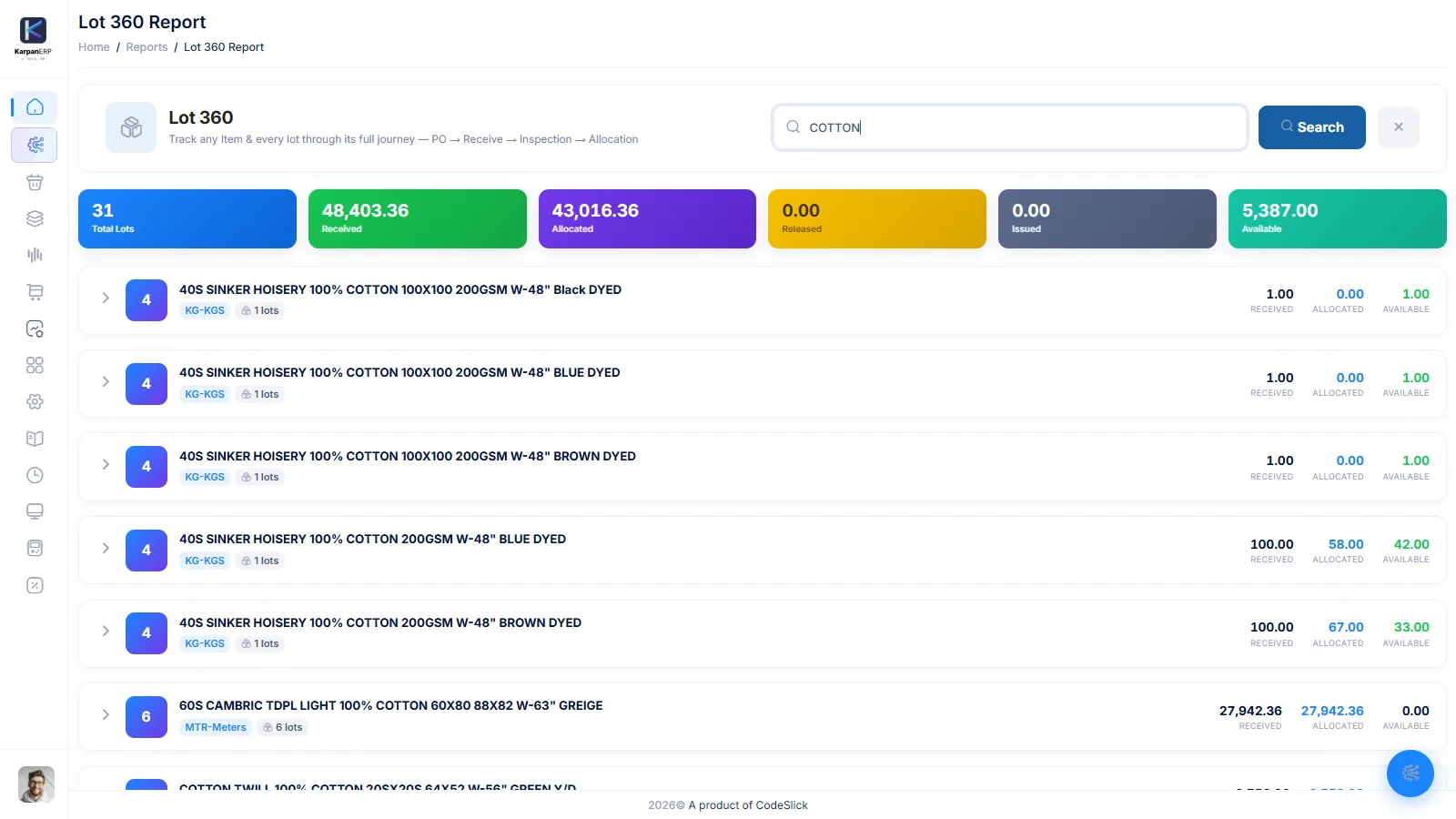
Each receipt is split into bale/than numbers and vendor lots. From then on, every lot shows how much is free, reserved and issued. Lot 360 opens the full history of one lot, and the stock ledger lists every movement like a bank statement.
- Bale/than and vendor lot at receipt
- Free, reserved and issued stock per lot
- Lot 360 and lot transaction log
- Store-wise stock ledger with Excel and print
Material sent out comes back on record.
Dyeing, printing, finishing and other processes are often done outside. Karpan keeps material with each job worker on its own stock, logs every lot that comes back, and books the loss. The rate rolls forward stage by stage, so after three processes you still know what one metre or one kilo really costs.
- Job worker orders for any process you set up
- Lots issued oldest first; negative stock blocked
- Received lock stops later edits to an issue
- Jobworker Stock report for material lying outside
Only good material becomes stock.
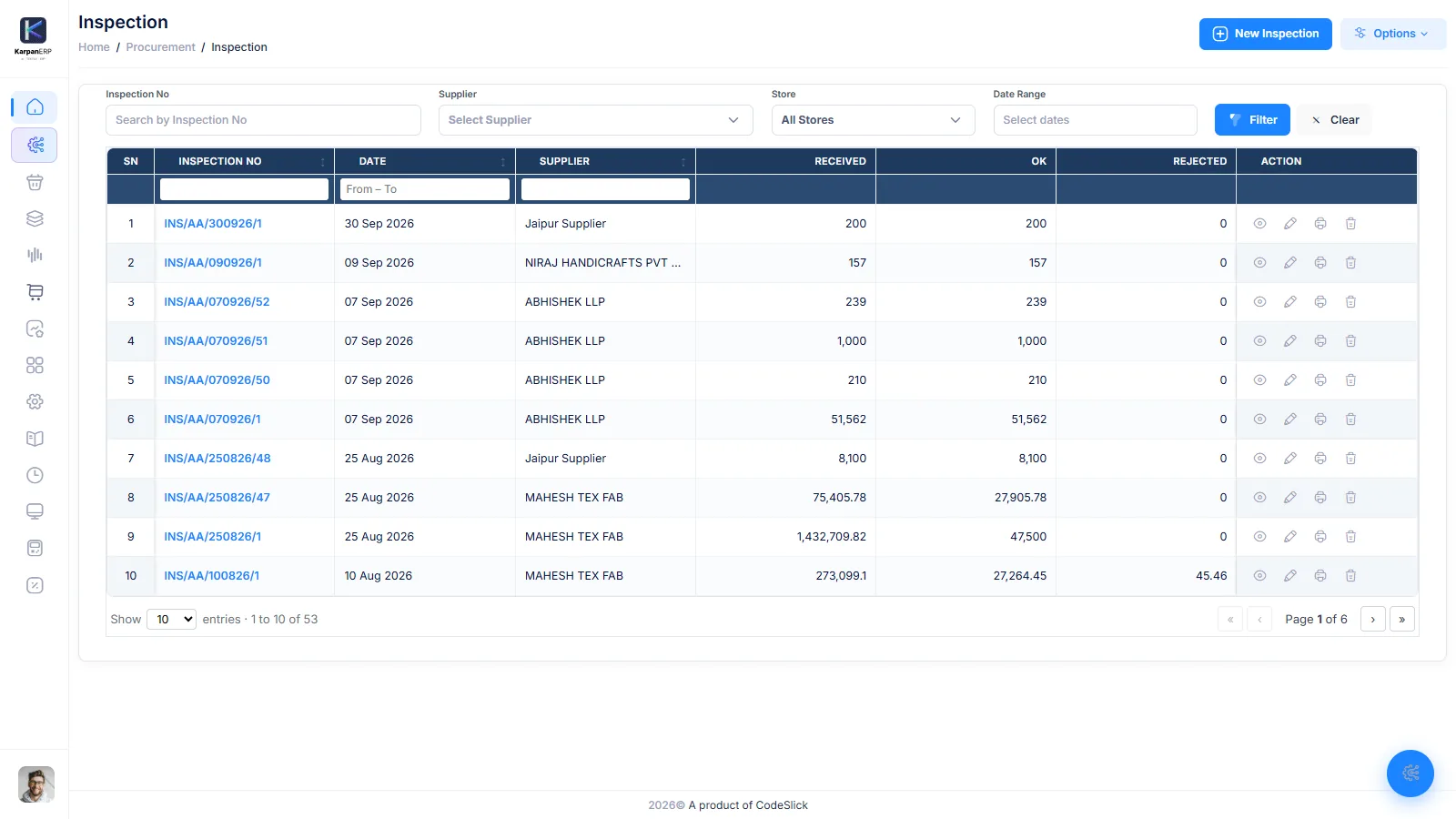
Inspection sits between receipt and stock. The store sees received quantity, but only the OK quantity can be reserved and issued. Rejected quantity is returned to the supplier with a vendor return, and the order-wise inspection report shows what passed for each order.
- OK and rejected quantity per lot
- Vendor return for rejected material
- Inspection can be reversed through the stock ledger
- Order-wise inspection report
What a textile unit gets in Karpan.
Lot-wise inventory
Receipt by bale and vendor lot, free, reserved and issued stock, Lot 360 and the stock ledger.
Lot-wise inventory →Job work and processing
Job worker orders, lot issue, receive back with loss, stock with each job worker and rate roll-up.
Job work management →Inspection and vendor return
OK and rejected quantity per lot. Only OK becomes stock. Rejects go back to the supplier.
Inspection and stock →Process planning
Lay out the process route on the planning canvas with input and output per process and planned cost against budget.
Planning canvas →Purchase
Purchase orders with approval and PO templates. A PO line cannot drop below what is already received.
Purchase and GRN →Stores, transfers and general stock
Stock transfer between stores and branches, and general stock issue and receive for consumables and spares.
Reports
Daily issue and receive, jobworker stock, stock ledger, procurement status, Lot 360 and order profit and loss.
Branches, roles and audit
Several units in one system with branch-wise data, role and field permissions, and a field-level audit trail.
Audit trail →Karpan AI
Ask about stock, lots and job work in plain English. Answers are read-only and follow each user’s role and branch.
Karpan AI →Textile ERP vs a general ERP
A general ERP can count stock, but textile work needs lots, outside processing and loss to be part of the daily flow. This is what Karpan gives you without extra setup.
| Need | General ERP (usual setup) | Karpan ERP |
|---|---|---|
| Lots and bales | Batch numbers, usually without bale/vendor lot split | Bale/than and vendor lot at receipt; Lot 360 history |
| Material at job workers | Generic subcontracting, set up per item | Stock with each job worker, issued and received lot by lot |
| Processing loss | Usually tracked outside the system | Loss logged on receipt and added into the item rate |
| Cost after each process | Needs manual costing | Base + process + loss rolled up stage by stage |
| Quality gate | Often a separate step or add-on | Only inspected-OK quantity becomes usable stock |
| Several units or stores | Usually supported | Branch-wise data, store-wise stock and stock transfer |
| Accounting and tax | Usually included | Not included; use your accounting software |
General ERP column describes a typical setup, not one product. Many general ERPs can do more with partners or custom work.
Where Karpan stops
Textile businesses differ a lot, so here is what Karpan does not cover today.
- Accounting and tax: Karpan is not accounting software. It does not file GST or VAT returns or make e-invoices. HSN codes, SAC codes and party GSTIN are stored, and you keep your accounting in your current software.
- Machines and looms: no loom, knitting machine or dyeing machine monitoring.
- Dye house lab: no dye recipes, shade matching or lab dip records.
- Spinning: no spinning or yarn-count production planning.
- Order entry: sale orders are built around styles, sizes and colours. If you sell only fabric, ask us in the demo how your orders would fit.
How to start with Karpan.
1. Bring one real lot to the demo. Book a free 30-minute walkthrough. Tell us how one lot moves today, from the supplier to the processor and back, and we will show it in Karpan.
2. Set up your masters. Materials, processes, parties (suppliers, job workers, buyers), stores and users. Setup, data import and training are quoted once, based on your size.
3. Start with new lots. We suggest entering opening stock by lot and running new receipts and issues in Karpan from day one. Karpan runs in the browser, so there is nothing to install.
There is a free plan for one branch and up to 3 users. Paid plans are per factory. See Karpan ERP pricing, or read more about job work and processing loss and lot-wise inventory.
Things people ask us.
What is textile manufacturing ERP software?
It is business software that tracks yarn and fabric by lot through purchase, receipt, inspection, processing and stock, and keeps the cost and loss of each process. Karpan ERP is one such system.
Can Karpan track fabric sent to dyers and processors?
Yes. You issue lots against a job worker order, receive them back lot by lot with loss, and see stock lying with each job worker in its own report.
How does Karpan work out processing loss and cost?
When a lot comes back, the received quantity and loss are logged. The new item rate is the base rate plus the process cost plus the loss, and it carries forward to the next process.
Can I track bales and vendor lots?
Yes. At receipt you split the quantity into bale/than numbers and vendor lots. Each lot shows free, reserved and issued stock, and Lot 360 shows its full history.
Does Karpan handle dye recipes or loom monitoring?
No. Karpan does not keep dye recipes or lab dips, and it does not connect to looms or machines.
Does Karpan ERP do accounting and GST filing?
No. Karpan keeps HSN, SAC and GSTIN details and e-way bill numbers on documents, but it does not post accounts, file returns or make e-invoices. Use it with your accounting software.
Which countries do you support?
We sell and support Karpan ERP in India, Bangladesh and Vietnam. It runs in a web browser.
See one of your lots in Karpan ERP.
A free 30-minute walkthrough built around how your material really moves.