

Job work management for textile and garments.
Issue fabric and yarn to job workers lot by lot, block negative stock, log processing loss, and get the true cost per metre when goods come back, ready for order costing. Material lying with each job worker stays in its own report, next to your lot-wise stock.
The automated stage rate roll-up
When dyed or printed fabric returns from a job worker, Karpan works out the true landed cost per metre:
Every metre sent out is accounted for.
FIFO lot issue
Issue verified physical lots to dyers, weavers and printers, oldest first, with system locks.
Negative-stock guard
The system stops an issue that is bigger than the stock you actually hold.
Loss accounting
Wastage is booked against the job worker and rolled into the item rate on receipt.
Job work cost, in every order.
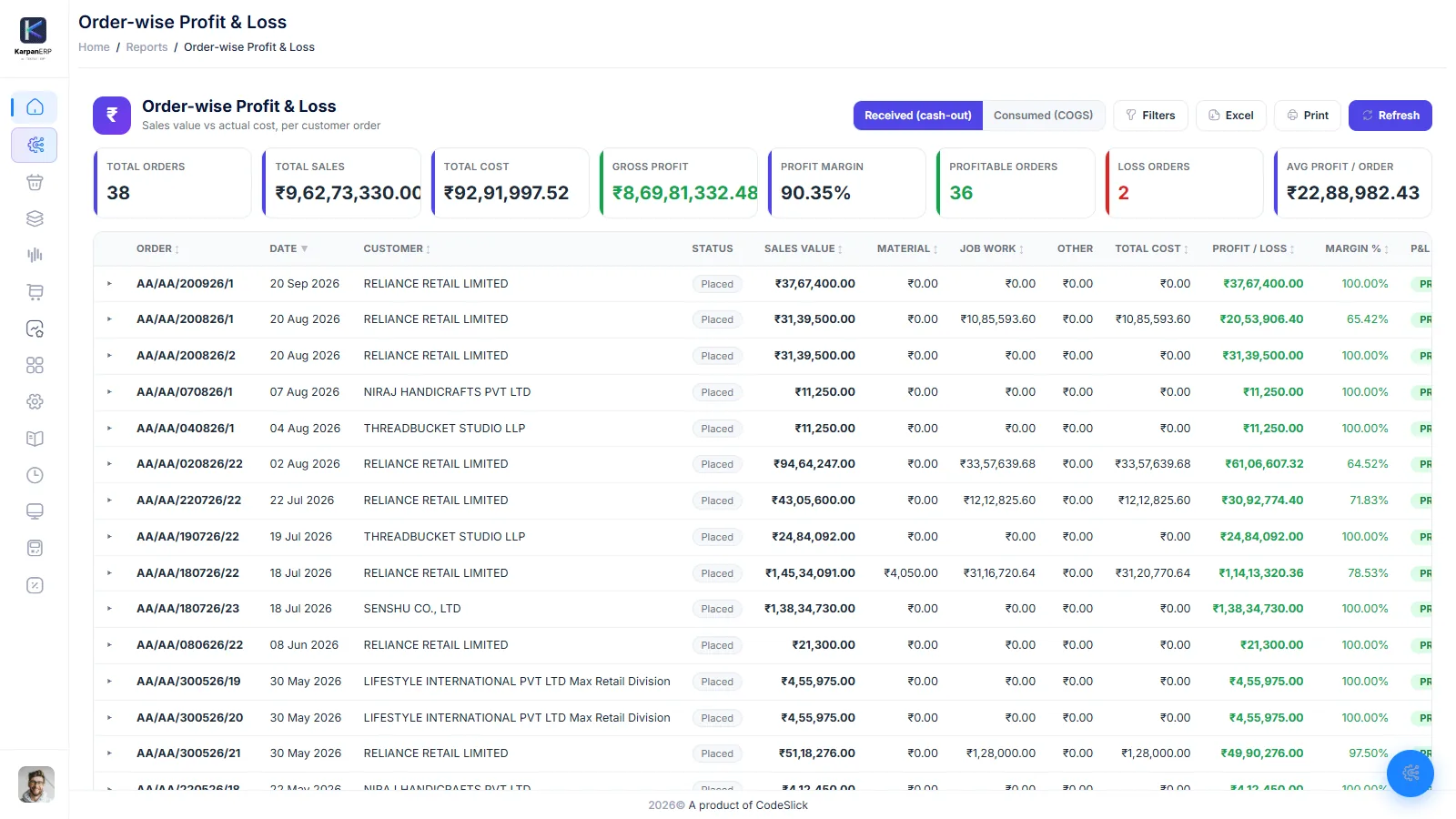
Order-wise profit and loss shows sales value against material, job work and other cost, so you see the margin an order really made. Processing houses can read more on Karpan for textile manufacturing.
- Job work cost per customer order
- Cash-out and consumed (COGS) views
- Excel and print in one click
See the lot leave and return.
Material goes to the job worker as a lot. When it returns, the received quantity and the loss are logged, and the new rate is worked out for you.
- Loss is booked against the job worker
- Every returned lot is logged
- The rate carries forward to the next stage
Out to the job worker, and safely back.
Reserve stock
Reserve free stock to the order before you issue it.
Issue by lot
Issue lots oldest first to the dyer, weaver or stitcher.
Process outside
Material stays on the job worker book until it returns.
Receive back
Log what comes back for each lot, with loss.
Roll up the rate
Base rate, process fee and loss add up into the item rate.
Built for outsourced processing.
Job worker purchase orders
Send material out for dyeing, weaving, processing, stitching or finishing with a proper order.
Reserve before issue
Free stock is reserved to the order first, so the same lot is never promised twice.
Received lock
Once material is received, the issue is locked. Nobody can change it by mistake.
Per-lot receive log
Every lot that comes back is logged, so you can match it with what went out.
Rate calculation popup
Open the rate roll-up and see how base, process and loss made the final rate.
Chained stage costs
When material goes through many stages, the rate carries forward stage by stage.
Know what is still outside.
Reports show exactly how much material sits with each job worker and how it moved day by day.
Jobworker Stock Report
Stock that is still with each job worker, by item and lot.
Daily Movement Report
Issue and receive for each day in one view.
Order-wise job work cost
Job work cost for every customer order in profit and loss.
Questions about job work
Can the system stop a wrong issue?
Yes. An issue bigger than the stock you hold is blocked. Lots are issued oldest first.
How is the item rate worked out?
Base rate plus process fee plus loss. For many stages, the rate is chained from one stage to the next.
Can I see stock lying with a job worker?
Yes. The Jobworker Stock Report shows it by job worker, item and lot.
Which processes are covered?
Dyeing, weaving, processing, stitching, finishing and any other process you add in the process master. For the basics, read what job work is in textile.
This module is part of Karpan ERP for garment manufacturing and textile manufacturing.
Stop losing fabric at the dyer.
Bring one lot that went to your dyer. We will show where it is, what came back and what it now costs.