

Fabric and material inspection software
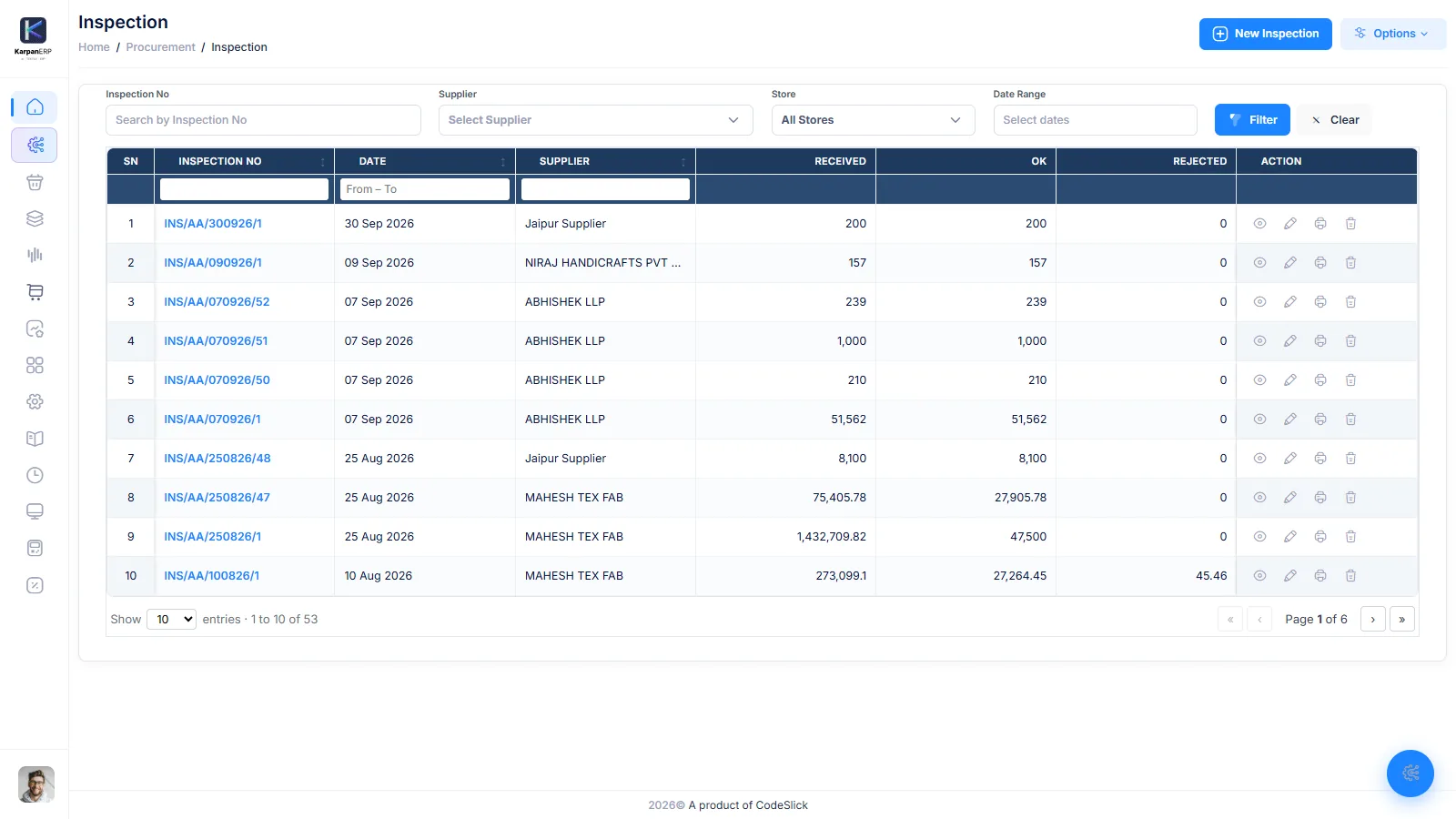
Karpan ERP puts an inspection step between goods receipt and stock. Each fabric lot, yarn lot or trim delivery gets an OK, rejected and short quantity. Only the OK quantity becomes stock you can reserve and issue; the rest goes back to the supplier with a vendor return.
| Vendor lot | Received | OK | Rejected | Short | Pending |
|---|---|---|---|---|---|
| VL-2041 | 220 | 214 | 6 | 0 | 0 |
| VL-2042 | 220 | 208 | 0 | 4 | 8 |
| VL-2043 | 180 | 0 | 0 | 0 | 180 |
Why inspect before stock
Fabric that has not been checked should not be cut. A shade difference, holes, a short-length than or a wrong GSM found after cutting costs the fabric, the cutting labour and often the delivery date. Found at receipt, it costs a phone call and a vendor return.
The trouble is that most systems count goods as stock the moment they arrive. Store can issue them before quality has seen them, and rejected metres sit in the stock figures for months.
In Karpan ERP, received material waits as “pending inspection”. Only what your checker passes becomes usable stock. Rejected and short quantities are kept apart and returned. This is part of purchase and GRN, and it feeds lot-wise inventory.
From the truck to usable stock.
Receive
Record the delivery against the purchase order and split it into bale/than numbers and vendor lots.
Inspect each lot
Open the pending lots and enter OK, rejected and short quantity for each. OK updates itself as you type: received minus rejected minus short.
Add the reason
Note a rejection reason and a remark, so the supplier and your team know why.
Stock is created
Only the OK quantity becomes stock. If the order has a BOM, the OK stock is reserved to that order. If not, it stays as free stock.
Return to supplier
Make a vendor return for rejected material, or return OK material that is not needed, with transporter, LR number and debit note details.
Report
The order-wise inspection report shows what passed and what failed for each order.
One bad lot does not hold up the rest.
Inspection works on each lot of a receipt. You can pass two lots today and leave the third pending until it is checked. The pending quantity stays visible (received minus OK, rejected and short) until every metre or kilo of the lot has a result.
- OK, rejected and short quantity per lot
- Partly inspected lots stay pending
- Filter pending lots by store, supplier and PO
- Inspection number and date on every check
| Vendor lot | Received | OK | Rejected | Short | Pending |
|---|---|---|---|---|---|
| VL-2041 | 220 | 214 | 6 | 0 | 0 |
| VL-2042 | 220 | 208 | 0 | 4 | 8 |
| VL-2043 | 180 | 0 | 0 | 0 | 180 |
Good stock goes straight to the order.
When a lot passes, its OK quantity becomes stock in the store it was received into. If the material was bought for an order with a BOM, it is reserved to that order at once, so nobody else issues it. Material bought without an order stays free.
- Only OK quantity can be reserved or issued
- Auto reservation to the order when a BOM exists
- Free stock when there is no order
- A checked lot is locked once its stock has been issued
Send it back with the paperwork.
Rejected material goes back through a vendor return linked to the receipt. Choose a rejected return, or an OK return for good material you no longer need. Note the transporter, LR number and date, and the debit note number and date, so accounts can settle with the supplier.
- Rejected return or OK return
- Linked to the receipt and the lot
- Transporter, LR number and date
- Debit note number and date for accounts
Inspection works with the rest of Karpan.
Purchase and GRN
Purchase orders from the BOM and receipts split into bale and vendor lots.
Purchase and GRN →Lot-wise inventory
Free, reserved and issued stock per lot, Lot 360 and the stock ledger.
Lot-wise inventory →Job work
Fabric sent out for dyeing or printing and received back with loss.
Job work management →Costing and order profit
Rejects and returns flow into the real cost of each order.
Costing and order profit →Where Karpan stops
Karpan records the result of your check. It does not tell your checker how to check.
- 4-point system and defect codes: Karpan does not score fabric with the 4-point or 10-point system and has no defect code list. Record the result of your own check as OK, rejected and short quantity, with a reason.
- AQL sampling: no AQL sample sizes or accept/reject tables.
- In-line and end-line QC: inspection in Karpan is for incoming material. Garment checks on the line are not covered; rejected pieces in production go to alteration and reject stock instead.
- Lab tests and photos: no lab test records, shade band or defect photo storage.
- Barcode scanning: not available today.
Things people ask us.
What is fabric inspection software?
It is software that records the quality check of incoming fabric and other material, lot by lot, and decides how much of it becomes usable stock. In Karpan ERP, only the OK quantity becomes stock.
Can Karpan inspect fabric lot by lot?
Yes. Each receipt is split into bale/than numbers and vendor lots, and each lot gets its own OK, rejected and short quantity. A lot can stay partly pending until it is fully checked.
What happens to rejected fabric?
It is kept out of usable stock and can be sent back through a vendor return, with transporter, LR and debit note details.
Is inspected fabric reserved to the order?
Yes, if the order has a BOM. The OK quantity is reserved to that order at once. Material bought without an order stays as free stock.
Does Karpan support the 4-point fabric inspection system?
No. Karpan does not score points or keep defect codes. Your checker inspects in the usual way and records the result as OK, rejected and short quantity.
Can I check yarn and trims too?
Yes. Inspection works for any material received against a purchase order, not only fabric.
See a delivery go from receipt to stock.
A free 30-minute walkthrough of receipt, inspection and vendor return in Karpan ERP.