

Garment costing and order profit software
Karpan ERP shows what a garment order costs while it is being made, not weeks after it ships. It builds the cost of one good piece step by step, from fabric at the real lot rate to every process and every reject, and sets it next to the buyer’s price.
| Step | Adds (₹) | Cost after (₹) | Plan (₹) |
|---|---|---|---|
| Fabric at lot rate | 96.40 | 96.40 | 94.00 |
| Cutting (own dept) | 6.00 | 102.40 | 6.00 |
| Printing (job work) | 14.50 | 116.90 | 14.00 |
| Stitching (own dept) | 22.00 | 138.90 | 22.00 |
| Reject loss | 3.10 | 142.00 | 0.00 |
Why garment costing goes wrong
Most factories cost an order once, before it starts, on a cost sheet: fabric consumption × rate, plus trims, plus cutting, making and finishing, plus a margin. Then the order runs. Fabric comes in at a different rate, the dyer loses more than expected, a printer charges extra, and 3% of pieces are rejected at finishing. Nobody adds these up until the order has shipped, and sometimes not even then. Our guide shows how to cost a garment order step by step.
Garment costing software closes that gap. It takes the real numbers from the floor (what was bought, issued, processed, received and rejected for each order) and keeps a running cost next to the planned cost.
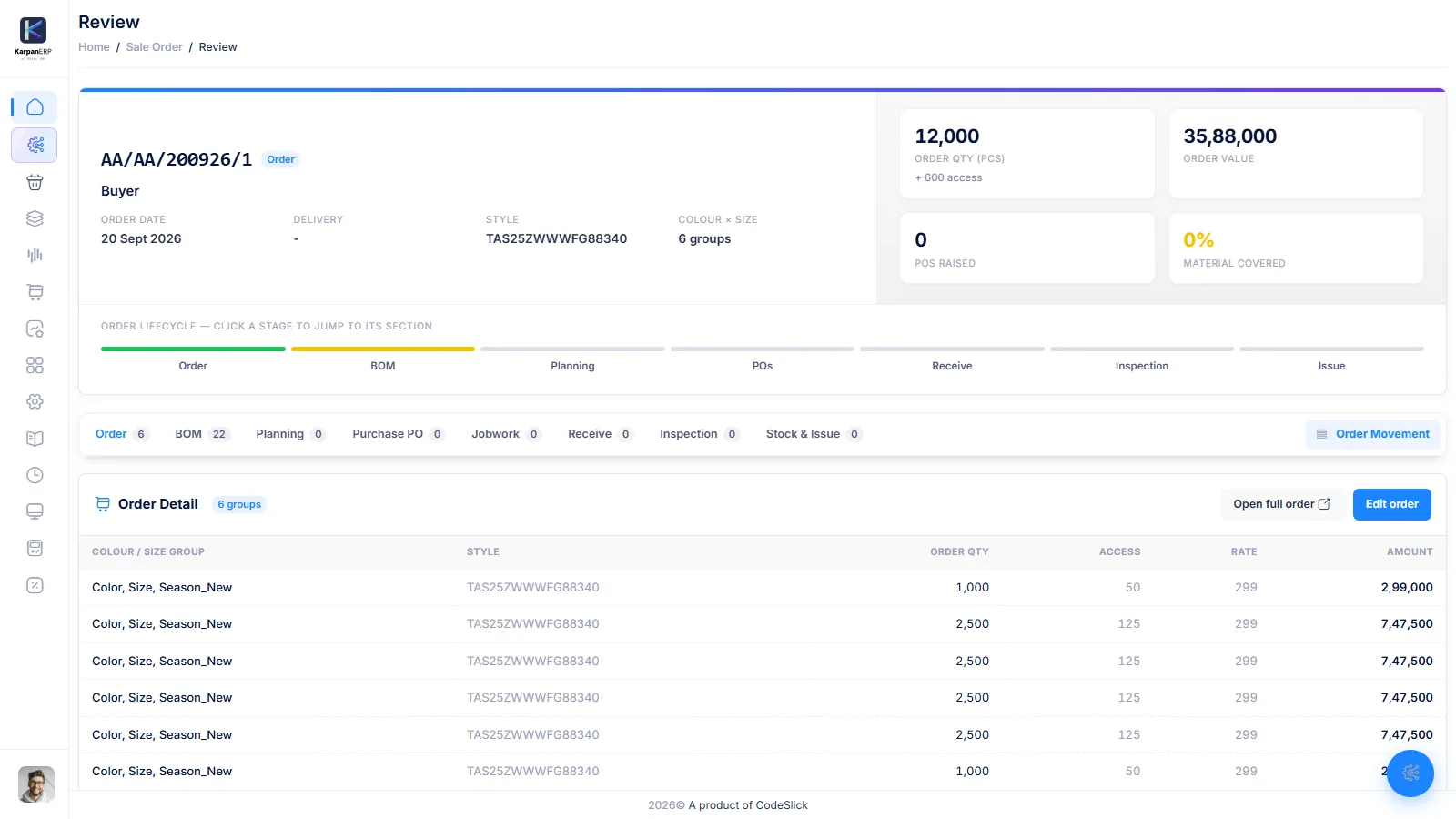
Karpan ERP does this from the documents your team already makes: the BOM and planning canvas, purchase receipts, job work and production entries. There is no separate costing sheet to keep up to date.
From planned cost to real profit.
BOM cost
The BOM lists fabric and trims for each size and colour, with average consumption and cost. This is your planned material cost per piece.
Planned process cost
On the planning canvas each process (knitting, dyeing, cutting, stitching and so on) gets its input, output and cost. You see planned cost against budget before you buy anything.
Actual material
When material is issued to an order, it is costed at the rate of the lot it came from. Returns to store are taken off.
Process charges
Work done in your own departments uses your rate per piece. Work sent out uses the job work rate on the work order.
Loss and rejects
Job work loss is built into the rate of what comes back. Rejected pieces are spread over the good pieces, less anything recovered through a debit note.
Cost of one good piece
Component costing adds it all up, step by step, and compares it with plan and with the buyer’s price.
Order profit
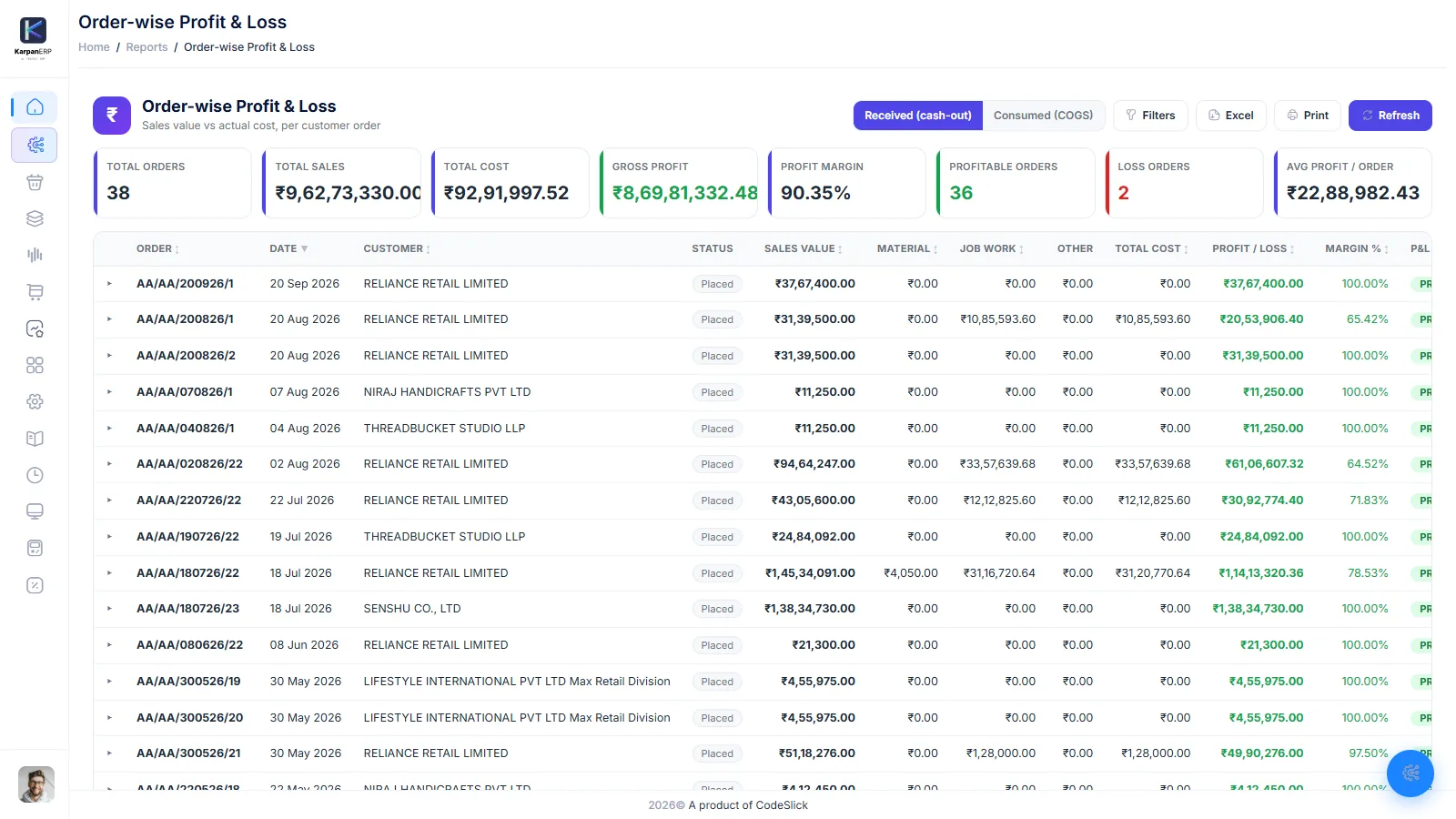
The order-wise profit and loss report puts sales value against material, job work and other cost for every customer order.
What one good piece really costs.
Pick an order and style. Karpan builds the cost of one good piece stage by stage: material at the lot rate, each process, then reject loss. Each step shows what it added, the running cost after it, and the planned cost for the same step, so you see exactly where the order went over.
- Cost of one good piece against the buyer’s price
- Profit per piece and margin
- Plan vs actual for every step and every item
- Cost by size and colour, so you see which sizes lose money
- Line-by-line cost sheet you can print
| Step | Adds (₹) | Cost after (₹) | Plan (₹) |
|---|---|---|---|
| Fabric at lot rate | 96.40 | 96.40 | 94.00 |
| Cutting (own dept) | 6.00 | 102.40 | 6.00 |
| Printing (job work) | 14.50 | 116.90 | 14.00 |
| Stitching (own dept) | 22.00 | 138.90 | 22.00 |
| Reject loss | 3.10 | 142.00 | 0.00 |
An early number beats a late one.
You do not have to wait for the last piece. While some steps are still open, Karpan uses the planned cost for the steps not done yet and marks the result as an estimate. Plain-language notes point out what matters: whether the order is in profit, the step that cost the most extra, sizes that lose money, and how much rejects are costing.
- Estimate while work is still running
- Planned cost used for steps not started yet
- Notes on profit or loss, biggest extra cost and rejects
- “Safe price to quote” that keeps at least a 10% margin on this style
Loss belongs in the rate.
When fabric comes back from a dyer, printer or other job worker, Karpan logs what came back and the loss, and works out a new rate: base rate + process charge + loss. That rate carries forward to the next process, so after three outside processes you still know the true cost of one metre or one kilo.
- Rate rolled up stage by stage
- Loss charged to the material that came back
- Job work rate taken from the work order
- Stock lying with each job worker in its own report
Rate of 1 metre after dyeing
Sample numbers. The rate carries forward to the next process.
Every customer order, profit or loss.
The order-wise P&L report lists sales value, total cost, gross profit and margin for each customer order. Filter by branch, customer, dates, or show only orders in loss. Open any order to see where the money went: purchases and material received, material consumed, and job work by job worker, lot and supplier.
- Two bases: received (cash-out) or consumed (COGS)
- Profitable, loss and break-even orders at a glance
- Estimated vs actual cost with the variance
- Jump from an order to its component costing
- Excel and print
Two ways to read the same order
Received (cash-out) counts what you bought and received for the order. It answers: how much money has this order taken out of the business so far? Use it to watch cash on big orders where fabric is bought up front.
Consumed (COGS) counts only the material actually issued to the order. It answers: what did the pieces we made really cost? Leftover fabric that is still in your store does not count against the order. Use it to judge the true margin of an order and to price the next one.
If the two numbers are far apart, you probably bought more than the order used. That is worth a look in lot-wise stock before the next purchase.
Costing works with the rest of Karpan.
BOM and planning canvas
The planned side of every cost: material by size and colour, process route and budget.
BOM and planning →Job work
Outside processes, loss and the rate roll-up that feeds actual cost.
Job work management →Production and WIP
Work orders, output by size and colour, and rejects, which all feed the cost of a good piece.
Production and WIP →Orders and merchandising
The sale order holds the quantities and price that profit is measured against.
Order management →Where Karpan stops
Costing is only useful if you know what is in it.
- Pre-order quotations: there is no separate cost sheet for an enquiry before the order exists. Component costing works on an order with a BOM or work order. For a repeat style, its “safe price to quote” is a useful guide.
- Factory overheads: rent, power and salaries are not spread across orders by themselves. You can build them into your own department rates per piece.
- Accounting: order profit is a management report, not your books. Karpan does not post to accounts or file tax returns.
- Currency: costs and profit are shown in one currency. There is no exchange-rate conversion between currencies.
Things people ask us.
What is garment costing software?
It is software that works out the cost of a garment order from its material, processes and losses, and compares it with the selling price. Good costing software uses real receipts, issues and rejects, not only the cost sheet made before the order.
How does Karpan ERP calculate the cost of one garment?
Component costing adds, step by step, the material issued to the order at its lot rate, the charge for each process (your own department rate or the job work rate), and the loss from rejected pieces. The result is the cost of one good piece.
Can I see profit for each order?
Yes. The order-wise profit and loss report shows sales value, total cost, gross profit and margin for every customer order, with a drill-down into material, job work and other cost.
What is the difference between the cash-out and COGS views?
Cash-out counts everything bought and received for the order. COGS counts only the material actually issued to it. The first shows money spent; the second shows the real cost of the pieces made.
Does Karpan include job work loss in the cost?
Yes. When material comes back from a job worker, the loss is logged and added into the new rate: base rate plus process charge plus loss. The next process starts from that rate.
Can I see cost by size and colour?
Yes. Component costing breaks the cost down by size and colour, so you can see if bigger sizes eat the margin of an order.
Does Karpan make quotation cost sheets?
No. Costing in Karpan starts from an order with a BOM or work order. There is no separate cost sheet for enquiries yet.
See the real cost of one of your orders.
A free 30-minute walkthrough of component costing and order profit in Karpan ERP.