

Run the factory floor from your phone.
Approve orders, scan lots, receive and inspect material, issue to job workers and count production, right where the work happens. Same data and rules as your web ERP.
- Same login as the web
- English & हिंदी
- Works with weak signal
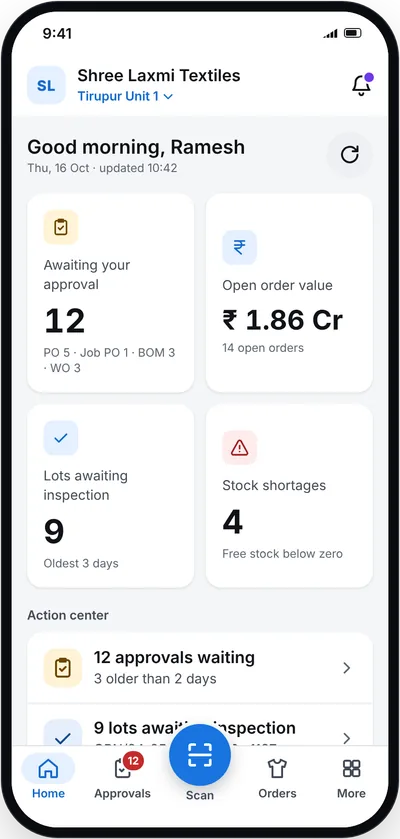
Built for everyone on the floor
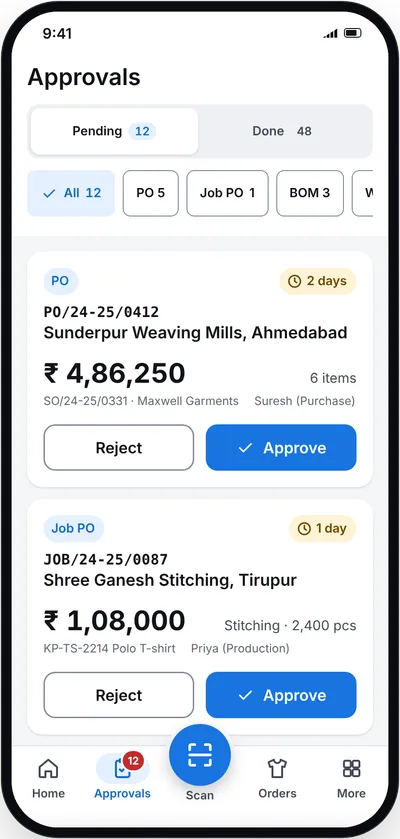
Approve from anywhere, with every fact in front of you.
Purchase orders, job work orders, BOMs and work orders wait in one list, oldest first. Each card shows the party, the amount and how long it has waited. Approve or reject right on the card.
- Full detail before you decide: items, amount and history
- Material short on a work order? You see each short item and must give a reason
- Who approved, and why, is saved for audit
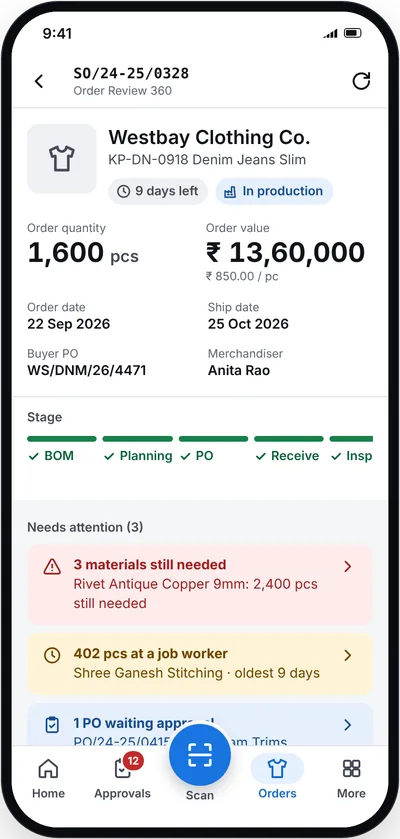
The whole story of an order on one screen.
Search by order number, buyer or style. Order Review 360 shows who, what, how many and when, then the stage bar, what needs attention, colour and size quantities, material, production, work orders and POs.
- Late orders stand out with days left in words and colour
- Every row opens its own detail
- If one section cannot load, the rest still shows
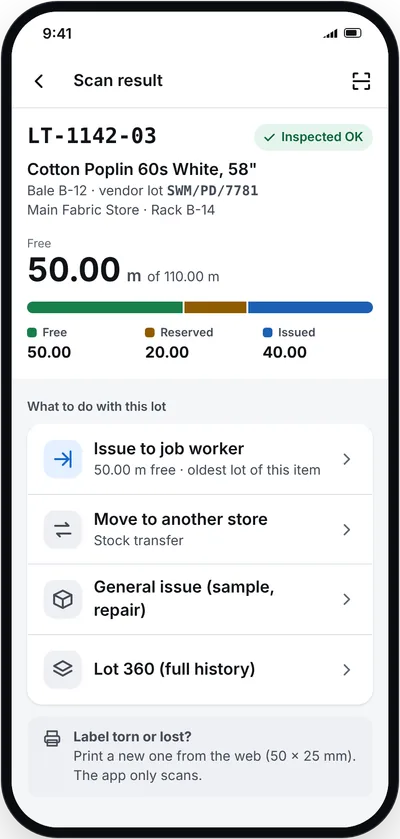
Point the camera at a lot. Know everything about it.
Scan any lot, roll or bale label to see its free, reserved and issued stock, where it came from and what inspection said. Then jump straight to the next job with that lot.
- Torch and type code always at hand
- The camera stays on, so the next scan is instant
- Only the actions the user is allowed to do are shown
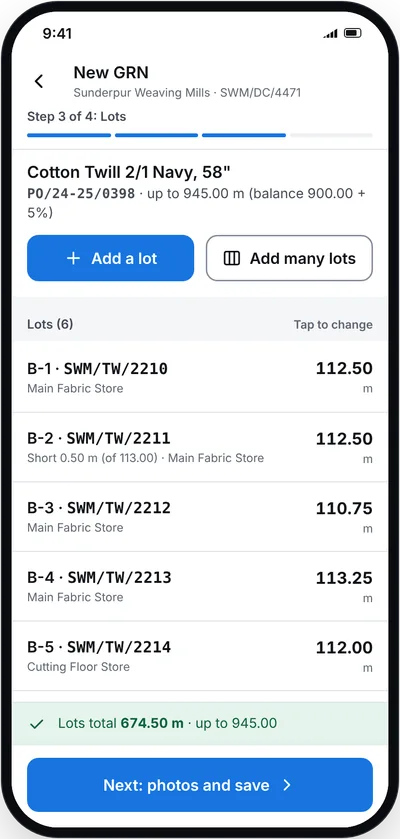
Receive material at the gate, lot by lot.
Pick the supplier and challan, choose items from open purchase orders, then add each roll or bale as its own lot with vendor lot number, quantity, short and store. Add photos and save.
- Only approved, open PO lines of that supplier are offered
- Big keypad sized for gloves; the unit decides the decimals
- Over the PO limit? The save button stays blocked
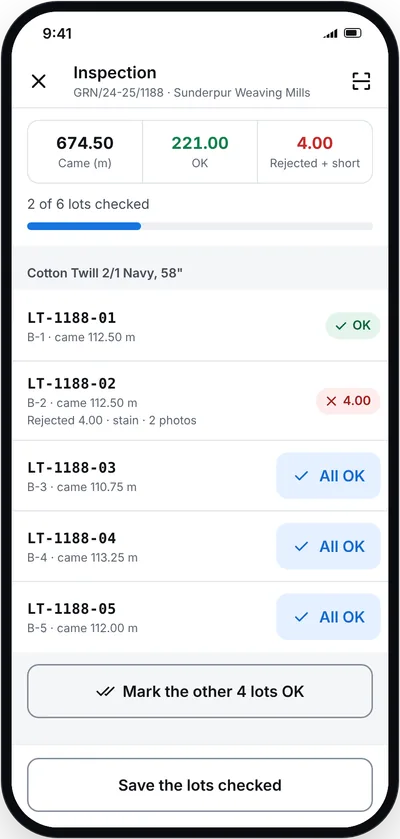
Inspect fast: one tap when a lot is fine.
Most lots are fine, so every lot has a one-tap All OK. Open a lot only when something is wrong, type the rejected and short quantity, give a reason and add defect photos.
- Totals on top add up live
- OK stock is free to use as soon as you save
- Return rejects to the supplier in one tap, never more than rejected
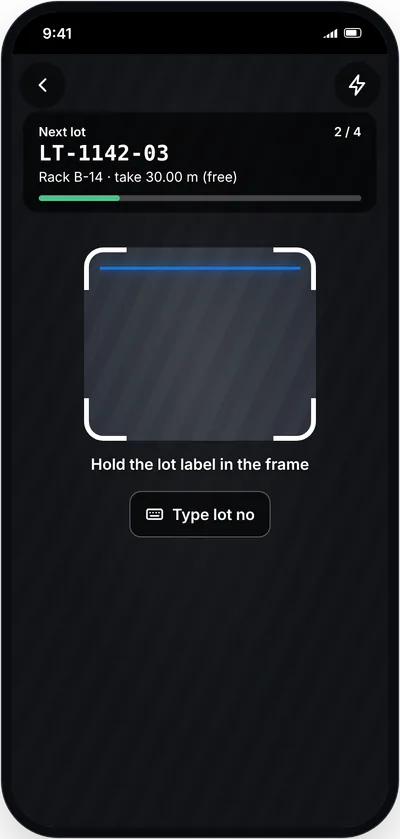
Issue the oldest lot first. Scan to be sure.
Pick the job worker and the job PO lines. The app fills quantity from lots in the same order as the web: reserved for this order, then free, then other orders. Each lot is scanned to confirm.
- The camera tells you which lot to pick next and where it is
- Wrong lot? A red flash with a plain reason
- Vehicle, person, phone and e-way bill details on the last step
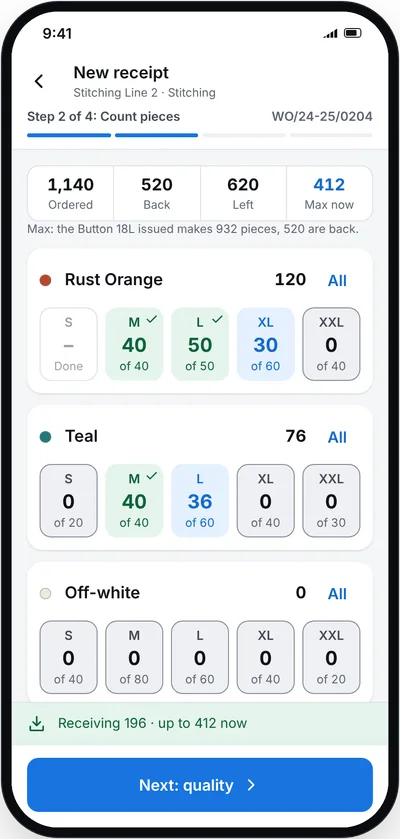
Count production by colour and size.
Receive finished pieces from a department or job worker against approved work orders. Each size is a big cell showing what you typed and how much is left. Then mark pieces OK, alteration or reject.
- Ordered, back already, left and max now shown on top
- The totals strip turns red with a plain reason when a limit is crossed
- Send WIP to the next department or a job worker the same way
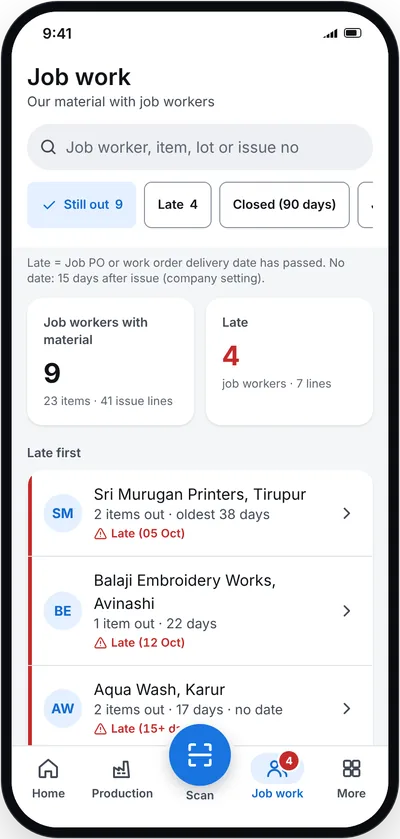
See who holds your material, and what is late.
One row per job worker with items still out and the oldest one, late ones first. Open a job worker to see issued, back and with them for every item.
- Late lines on top
- Send reminder prepares a WhatsApp message on the phone
- Call button when the party has a phone number
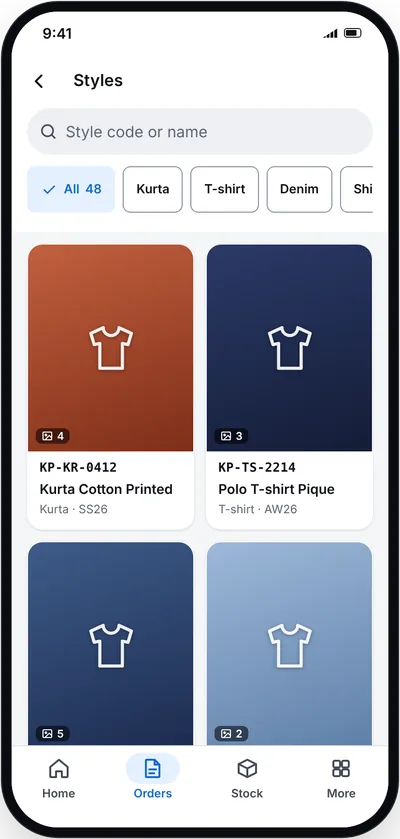
Show the catalogue. Take the order on the spot.
Two large style pictures per row, kept on the phone so the catalogue opens offline. Pick colours and sizes, type pieces per cell, save. It is the same sale order as the web and opens in Order Review 360.
- Colours and sizes ordered before, and last orders of the style
- Same quantity in all cells with one number
- Prices only for users with the right to see them
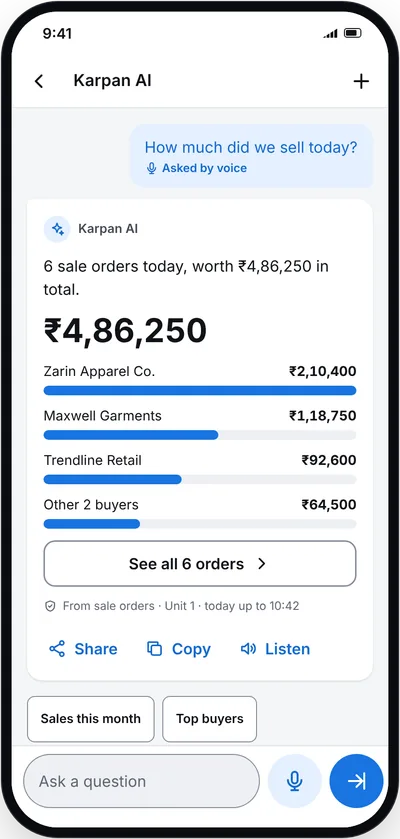
Ask Karpan AI. Type it or say it.
Ask in plain words, in English or Hindi. The answer comes as one sentence, then the big number, then a short list, with where the data came from and when. Open the screen, share, copy or listen.
- Tap the mic once, no holding, works with gloves
- Nothing is sent until you tap Ask
- Answers only what the user is allowed to see
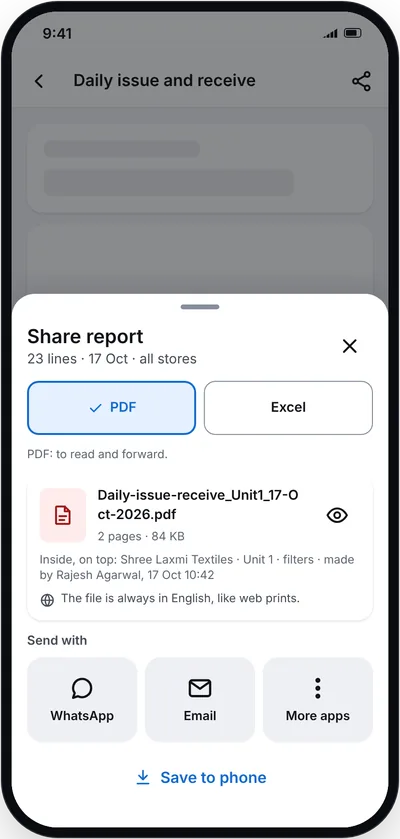
Open a report. Share it as PDF or Excel.
The important reports, grouped like the web menu, each with one line on what it answers. Quick date chips and filters, then share a PDF to read and forward or an Excel file to work with.
- The file names company, branch, dates, filters and who made it
- Send on WhatsApp, email or any app
- Money reports need the matching right
Weak signal in the store? Keep working.
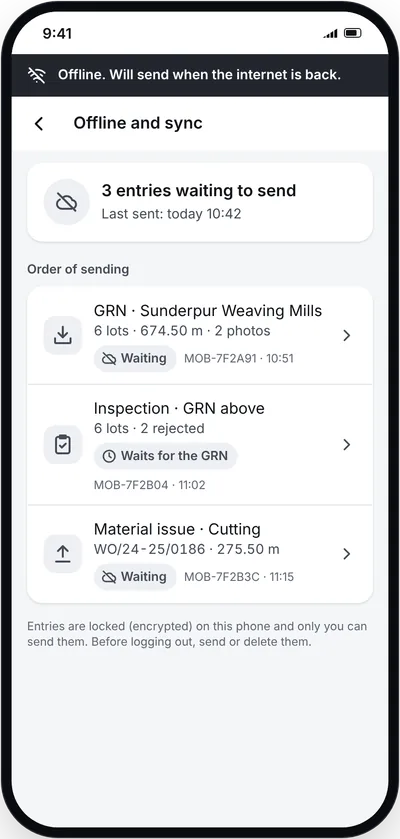
Offline, the main button becomes Save on this phone. Entries wait safely and are sent when the internet is back. If something changed on the server, you see what you entered next to what is there now.
- Clear banner: offline, sending, all sent
- Stock is checked again when the entry is sent
- Fixing and resending never creates a duplicate
Everything else your team needs.
Company code or QR
Connect the phone to your company once, then straight to sign in.
Fingerprint or face unlock
Same login as the web; the app locks itself when left idle.
Branch switch
Only the branches a user may use; last one ready selected.
Stock and Lot 360
Free stock by store and lot, and the full life of any lot.
Stock transfer
Move lots between stores by scanning; the other store scans to receive.
General issue and receive
Cash and sampling issues to a party, and what comes back.
Return to supplier
A vendor return from rejected lots, same numbering as the web.
Send WIP
Move work in progress to a department or job worker by size.
Alerts with quiet hours
Only alert types you have rights to; group alerts open the list.
Your brand, light or dark
The app wears your logo and colour after sign in.
English and Hindi
Every screen in English or हिंदी.
Safe app updates
Never during an entry or scan; waiting entries are kept.
A phone in every hand, with the same control.
Your rights, your menu
The menu is built from each user’s rights in the web ERP. Not allowed means hidden, never greyed out.
Same rules as the web
Same numbering, limits and checks. The server checks stock again before anything is saved.
Safe offline
Entries wait on the phone and are sent when the internet is back, never twice.
Every action recorded
History shows who did what, from the web or the app.
The right job on the right screen.
Done on the phone
- Approve or reject with all facts in front of you
- Receive, inspect, issue and transfer by scanning lots
- Count production pieces by colour, size and quality
- Take a sale order with colours and sizes
- Share reports as PDF or Excel
Stays on the web
- Edit or cancel saved documents (GRN, issue, receipt)
- Print lot labels
- Heavy reports (listed under “On the web” in the app)
- Reject cost and money a user has no right to see
- Setup and master data
Questions about the mobile app
Which phones does the Karpan ERP app run on?
Android phones and iPhones. It is one app for the textile ERP, in light or dark theme, in English or Hindi.
Do my staff need a new account for the app?
No. They use the same email and password as the web ERP. The phone is connected to your company once with a company code or QR, then a fingerprint or face unlock keeps sign in quick.
What can each user see in the app?
Only what their rights in the web ERP allow. The menu, Home cards, approvals, money values, reports and even Karpan AI answers follow the same rights. Anything not allowed is hidden.
Does the app work without internet?
Yes, for store work. Entries are saved on the phone and sent when the internet is back. If something changed on the server meanwhile, the app shows what you entered next to what is there now, and resending never creates a duplicate.
Can we scan lot and bale labels?
Yes. Point the camera at a lot label to see the lot and its next jobs. Scanning is also used to confirm each lot during issue, stock transfer and receive.
Is the data in the app the same as in the web ERP?
Yes. The app works on the same ERP, with the same numbering and rules. A GRN, issue or sale order saved on the phone is the same record you see on the web.
See the Karpan ERP app on your own workflow.
Book a free 30-minute live demo. We show the app and the web ERP together, with your orders, lots and job workers.